
Educator Review · 2026 Educators Pick Best of STEM® Winner, Data Collection & Analysis · Reviewed by Jason Aldridge, certified classroom teacher · Educator NPS 8/10
PASCO Sparkvue 5 Review: “An Eight for Me Is an Extremely Good Product”
PASCO Sparkvue 5 is PASCO Scientific’s free data collection and analysis software for STEM classrooms, built for wireless or wired PASCO sensors with PASCO’s “pair and go” setup, and released free on Windows, Mac, Chromebook, iPad, Android, and PASCO dataloggers. Jason Aldridge, the certified classroom teacher who judged the entry, scored it 8 out of 10 and calls that a high mark from a tough grader.

Lead clip: “Why an 8 Is a High Score for Sparkvue 5: A STEM Educator’s Review”
What educators are saying
Jason Aldridge, from the interview.
Why Sparkvue 5 works in the classroom
The four parts that stood out to Jason Aldridge.
His reason for the score: he expects a class to get from collecting data to talking about it quickly, so the period goes to analysis, arguments, and predictions instead of building displays.
PASCO releases Sparkvue 5 free for every user, with all features: Windows, Mac, Chromebook, iPhone and iPad, Android, Chromium browsers, and PASCO dataloggers.
In the judge’s reading: arrow keys instead of a mouse, adjustable text size, and text to speech, so a student with an impairment takes part instead of watching. PASCO designed Sparkvue 5 to meet WCAG 2.2 Level AA.
On camera, Aldridge pointed to searchable tutorial videos, a chat option to the online help center, free webinars, and an experiment library. PASCO partners with curriculum providers including OpenSciEd.
“An eight for me is an extremely good product”
Jason Aldridge has worked in education since 2009: ten years teaching high school math, most of it ninth-grade Algebra 1, then instructional coach, assistant principal, and district math coach.
Today his title is District Curriculum Specialist: Secondary Mathematics, at Charleston County School District in South Carolina, and he judges the Educators Pick Best of STEM Awards as a certified classroom teacher.
This year he gave PASCO Sparkvue 5, the free data collection and analysis software named the 2026 Educators Pick Best of STEM® Winner for Data Collection & Analysis, an 8 out of 10, and he wants you to know what that number means coming from him. He sat down with Daylene Long, founder of the awards, to explain.
Aldridge judged the entry: PASCO’s product description and materials, and demonstrations of Sparkvue 5. He did not run Sparkvue with students. Interview conducted by Daylene Long, founder of the Educators Pick Best of STEM® Awards. This conversation has been edited and condensed for clarity.
The educator behind the review
Daylene Long: Before we get into Sparkvue, tell me about your background and what you’re focused on now.
Jason Aldridge: My name is Jason Aldridge. I’ve been in education since 2009. I started as a math teacher and I taught for ten years, all in high school, but mostly in ninth grade, Algebra 1, to some of our struggling math students. That was my strong point, to work with students that struggle in math.
Probably ’cause I struggled in math when I was in high school, and in middle school. So I kind of know what they’re thinking and what they’re learning, how they learn.
I was a teacher for ten years, and then I became an instructional coach at a high school here in Charleston, and then moved into an assistant principal role at the high school level, and then eventually I went to work for the district office.
I was a math instructional coach for the district for several years, and then this past year became the math coordinator for Charleston County. My main job is to improve math and math achievement in our district through making sure our teachers are prepared to deliver high quality math instruction.
We’re really trying to focus a lot more on reasoning, building logic and reasoning skills in our kids. We found that a lot of our students, even the ones that are doing it well, are basically thinking they have to memorize something in order to do the math.
We’re trying to figure out how do we give our kids tools so that they can focus more on making sense of the math, and why it works, and multiple ways of doing the same problem, as opposed to we want everybody to do it this way. Focus in more on the process than on the answers, so to speak.
First impression: time to make sense of data
Long: What was your first impression of PASCO’s Sparkvue, and how does something like it fit into that emphasis on sense-making and hands-on investigation?
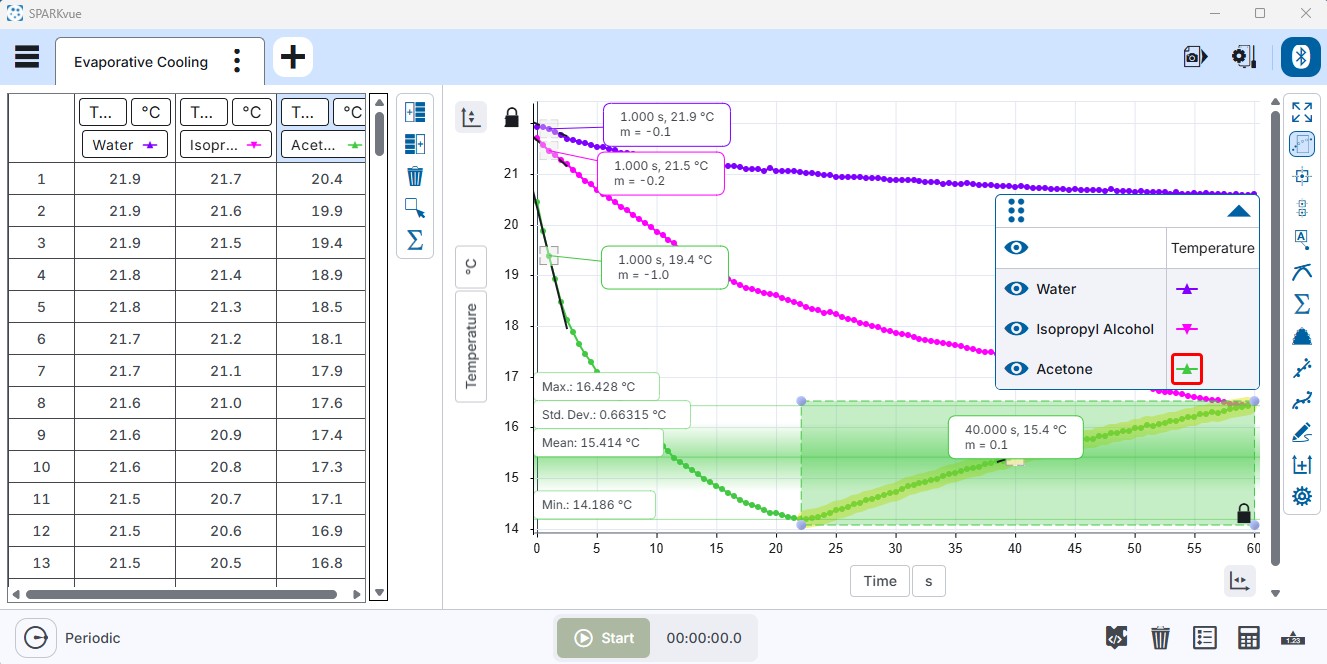
Aldridge: PASCO’s Sparkvue is a really great tool to allow students of all ages, K all the way up to twelfth grade and even beyond, to collect data and be able to use the technology to analyze what that data looks like. So it just gives students an opportunity to focus most of their time on reading the data.
They do have lots of involvement in selecting what they want their data outputs to look like, but as far as the part that the students are using, where they’re learning, that comes from analyzing the data, and teachers are building all their instruction around the analytics.
So lots of opportunities for questions, good discussion points in class, arguments, drawing conclusions. So again, that matches up a lot with what I was saying earlier about what we’re trying to do in math is build more time in our schedules to focus on making sense of what we’re trying to learn.
Arguing from data
Long: You wrote that Sparkvue is “very helpful for teachers looking to increase student discourse around science.” What does that look like in a classroom, when kids are arguing from data they collected themselves?
Aldridge: I think it starts by students not focused on a single answer. When you have a culture of thinking in your classrooms and making the emphasis on trying to think outside the box or formulating an argument, then oftentimes there’s not a single correct answer or response that you’re looking for.
So that looks to me like a culture in the room where students are trying to think outside the box. They’re trying to make predictions. They’re trying to use what they have to tell a story. And sometimes those stories may be the same, and sometimes two students might have completely different views on what that data means.
And so it just creates that environment where students are encouraged to try to think about multiple possible scenarios that could possibly happen through the data that they’ve collected with the Sparkvue technology. So as a teacher it’s great, because you’re facilitating a discussion as opposed to trying to get all of your kids to get exactly the same answer. I think that’s what’s powerful about what this technology can do in a classroom.
“You’re facilitating a discussion as opposed to trying to get all of your kids to get exactly the same answer.”Jason Aldridge, on what a classroom looks like when students argue from data
Collaboration and turn and talk
Long: You said your favorite feature was data streaming, because students can share data across their devices. How does that play into collaboration and discourse in a lab period?
Aldridge: When I was doing the review of PASCO’s Sparkvue, one of the big things that we talked about was the ability to increase the discourse in the classroom around the data collection. So you really can’t have discourse if everybody’s working independently. And so I asked about collaboration and how can this help a teacher increase collaboration in their classroom.
The students can have a little bit of time to think about what they’re looking at, as opposed to everybody around one computer. And now one person may be kind of talking through what they think, and then it may influence some other students’ thoughts without having the chance to think through it first.
So in math we do a lot of turn and talks. If I give a problem to a group, I’m gonna allow them to think about it and then turn and talk to their partner, and then we share out. Sometimes we share out what our partners say. That’s just a technique that we use in math.
I’m sure it’s used in science as well, or other classes. But if I’m using PASCO’s Sparkvue and the students are given a little bit of an opportunity to take a look for a minute at the data, come up with their own analysis, conclusions, predictions, then they can turn to their partner, get with their groupmates, and then have a rich discussion around whether you agree or disagree with each other, what were some similar but different notices and wonders.
Discourse is in the standards
Long: Is the turn and talk piece something that’s in the standards, or is it more of a research-based practice?
Aldridge: Different states may be a little bit different, but in South Carolina, for math, we have math process standards, and that falls into a process standard.
I know science and ELA both have, and social studies, they all have something similar, where there’s standards on what you teach during the school year, but there’s also standards on how you teach it. And the turn and talks and discourse is all laid out in the process standards for whatever subject that you teach.
So all of that is part of an expectation and what we’re trying to work towards in our classroom. So to answer your question, yes, it actually is in the standards.
Free, on every device
Long: Sparkvue 5 is free, and it runs on Chromebooks, phones, tablets, laptops, and PASCO dataloggers. What does that change for a science department, or for a school that’s all Chromebooks or all phones?
Aldridge: Well, schools are gonna like this one, because the new version, version five, is absolutely free. So for anybody. I actually went on it on my computer earlier, and you can just download it straight from the website. So that is a free software.
So any school, any teacher can access that right now on the website and just download that software. And it’s compatible with every device. I know Apple, Macs, also Windows, PCs, any type of phone that you have, iPads, other tablets, and Androids, so it’s compatible with all of the software, all of the tech, the devices that you need or may have in your building.
So yeah, that software is free, free for anybody who wants to download it. Which is great.
“Any school, any teacher can access that right now on the website and just download that software.”Jason Aldridge, on Sparkvue 5 being free
Text to speech and keyboard controls
Long: You noticed the text to speech and keyboard controls, which are new in Sparkvue 5. How do features like that change who gets to participate fully in a lab?
Aldridge: I think that the text to speech and the keyboard features are just essential features for a teacher to have, because it allows students who may struggle with some features on a computer, or with any type of impairment or anything that would cause them to not want to participate or not be able to participate, it gives them that opportunity.
So for instance, the arrow keys that can be used instead of a mouse. A lot of students have a hard time with the mouse and trying to move that around and figuring out how to work the cursor. And I actually did see how the arrow keys work.
You just press one of the right or left and it just scrolls right through to the next part of the software, whether it’s a new text box or it’s the next cell in the table that it needs to go to. So you can actually get through it faster sometimes by just using the keys.
And I think a lot of students will appreciate that. But the text to speech as well. You can adjust the size of the text on the screen, you can talk and the text will come out. So just really, really good to make sure that you can reach and involve all of your students.
Because what I wouldn’t want as a teacher is, going back to our group work that we were talking about earlier, now somebody else kinda takes over the assignment because they are able to navigate through with all of those other features, and then I never really get a chance to experiment with it because of something that’s causing it to be difficult for me.
So I appreciate that PASCO and Sparkvue have put in those features for students. It’s really great.
“You can actually get through it faster sometimes by just using the keys. And I think a lot of students will appreciate that.”Jason Aldridge, on keyboard controls instead of a mouse
Training and support
Long: You pointed to the free training resources in your review. What would you tell a teacher who’s bringing Sparkvue into the classroom for the first time, in terms of the support that’s there for them?
Aldridge: Well, there is an abundance of resources that you can access through Sparkvue’s website, and that includes tons of tutorial videos for teachers to show how to use some of the features. You can just search what you’re looking for, it will come up.
And there’s also a chat option, so if you wanted to speak to somebody from Sparkvue, you can click on the chat. That’s like their online help center. They will get in touch with you that way, so that’s really helpful to be able to talk to a person there.
They have webinars available for teachers that are free that they can join. Sparkvue partners with some curriculum companies. One of them is OpenSciEd. We use OpenSciEd in Charleston County, so I know a lot about it, but they are partnering with those curriculums.
So you can use it alongside with those, but also there’s an experiment library as well that teachers can access if they want something that is more of a standalone activity for students that comes with directions. It comes with all the materials that you need for students.
So just a lot of different ways that teachers can get involved and learn a little bit about each of the features. I thought that was an abundance of resources for teachers if they needed it.
What earns an 8 out of 10
Long: I have a feeling you’re a tough grader. You gave Sparkvue an 8 out of 10. What earns an 8 from you, and what would you tell a colleague who’s deciding whether to put it in front of their students?
Aldridge: Well, I think it’s important to know that an eight for me is an extremely good product. So I kind of look at a scale.
I’m a math guy, so I look at a scale from one to ten, and I’m thinking a five, and a four to a six, is neutral, and so I’m actually pretty up there with the eight. So I want you to know I might be a tough grader there, but I saw extreme value in the product, PASCO Sparkvue.
Once you get the data, if you didn’t have Sparkvue, you’re gonna probably have to spend a lot of time creating these displays. So now you’ve got a whole room trying to make a bar graph or a pie chart or a circle graph or a table, whatever the data display is.
Whereas in Sparkvue you select a template and then you just pick what kind of graph you want, and then you do have to label the axes, and there is some involvement. So it’s not completely taking that ownership away from the student.
But what I appreciate the most, and why it received an eight, which was a high score for me, is because if I’m in a room with a teacher using Sparkvue, they’re gonna be able to get to that conversation, and they’re going to be able to spend a lot of time on it.
Because in a traditional classroom without this, most of that time is going to be spent doing those other things, and you might get a couple of minutes out of them with the discussion. But with this, you’re going to be able to spend a whole lot more time letting the kids take a look at the data.
And I think that really could contribute to a lot of students just developing a real desire to learn more about math and science, because they’re not getting bogged down in some of the procedural things that might come along with it that would cause a little bit of frustration. And I think they’re gonna really enjoy the conversations they have.
“With this, you’re going to be able to spend a whole lot more time letting the kids take a look at the data.”Jason Aldridge, on why 8 out of 10 is a high score from him
Getting to the conversation quickly
Long: One more, because I heard it between the lines. Your goal as an educator is to get students to that conversation about the data quickly. How does that tie into developing critical thinking skills? In CTE standards and in college and career readiness, that is the skill that keeps coming up as missing.
Aldridge: As a person who works a lot with teachers and principals, and I know we’ve kind of said this earlier with the discussion being so important, and then going back to this idea that we want our kids to spend most of their time analyzing data and making discussion points, developing arguments and predictions.
We want to spend as much of our time as possible doing that. So that means we have to get to that point in the lesson really quickly.
And so by using PASCO’s Sparkvue, you can get there very, very quickly and spend the majority of your time having students notice things, wonder about things, talking with their peers about what they believe could be the reason why this data looks this way. I think that’s really important in developing the critical thinking skills that we need.
I know in math, for instance, kind of goes back to making sure that the answer is not the most important thing. We want our students in math to be doing the same problem in tons of different ways. There’s all kinds of ways to do a math problem.
And if our students think that there’s just one way to get to a solution, then they really think that they have to go home and memorize a bunch of things in order to be successful. And what we’re trying to teach them is there are many different routes and there’s many different ways to interpret.
And the important part is to build those skills so that they can not only interpret data in a reasonable way, but also be able to articulate why they believe what they believe in.
So I think that getting to those discussion points are extremely important for students, because we really are trying to work on those critical thinking skills in our kids.
“By using PASCO’s Sparkvue, you can get there very, very quickly and spend the majority of your time having students notice things, wonder about things, talking with their peers.”Jason Aldridge, on critical thinking
PASCO Sparkvue 5 is free for every user on every platform, with all features, according to PASCO Scientific: www.pasco.com/products/software/sparkvue. Educator judges rate Best of STEM entries on a Net Promoter Score scale; scores are reported exactly as submitted.
In his own words
Short clips from the interview, one to two minutes each, on the Best of STEM YouTube channel.
Is Sparkvue 5 Free? Yes, on Every Device: A STEM Educator’s Review
Is Sparkvue 5 free, and what devices does it run on? Version 5 is a free download for any school and any teacher, on the computers, tablets, and phones a building already has.
How Sparkvue 5 Helps Students Make Sense of Data: A STEM Educator’s Review
How does Sparkvue 5 help students make sense of data? Where student time goes: collecting, then reading and analyzing, with the questions, arguments, and conclusions that follow.
Sparkvue 5 Accessibility: Text to Speech and Keyboard Controls Reviewed
How do text to speech and keyboard controls change who participates? Arrow keys instead of a mouse, adjustable text size, and text to speech, in the words of a curriculum leader who calls them essential.
Sparkvue 5 Training and Support for Teachers: A STEM Educator’s Review
What training and support does a teacher get with Sparkvue 5? Searchable tutorial videos, a chat option, free webinars, curriculum partners including OpenSciEd, and the experiment library.
Questions educators ask about Sparkvue 5
Tap a question. Quotes from the written review are verbatim; interview quotes are lightly edited for clarity, never for meaning.
Is Sparkvue free?
Yes. PASCO Sparkvue 5 is free for every user on every platform, with all features, according to PASCO Scientific: no subscriptions, paywalls, or limited versions. It runs on Windows, Mac, Chromebook, iPhone and iPad, Android, Chromium browsers, and PASCO dataloggers. Jason Aldridge, the certified classroom teacher who judged the entry, checked before the interview:
“Schools are gonna like this one, because the new version, version five, is absolutely free. … I actually went on it on my computer earlier, and you can just download it straight from the website. So any school, any teacher can access that right now on the website and just download that software.”
Does Sparkvue work on Chromebooks?
Yes. PASCO lists Chromebook among the platforms Sparkvue 5 runs on, with Windows, Mac, iPhone and iPad, Android devices, Chromium browsers, and PASCO dataloggers, and says that broad compatibility is meant to help schools provide STEM learning to every student. Aldridge, on camera:
“It’s compatible with every device. I know Apple, Macs, also Windows, PCs, any type of phone that you have, iPads, other tablets, and Androids, so it’s compatible with all of the software, all of the tech, the devices that you need or may have in your building.”
Is Sparkvue accessible for students with disabilities?
PASCO designed Sparkvue 5 to meet WCAG 2.2 Level AA guidelines, which PASCO says exceed new ADA software requirements. Its listed accessibility features are keyboard navigation, screen reader support, adjustable text size, high-contrast ratios, alt text for images, and video captions. Aldridge noticed the text to speech and keyboard controls during judging. From his written review:
“New features, such as text to speech and keyboard controls, have been added to make this experience even more accessible to learners with diverse needs.” (written review, verbatim)
What training and support does a teacher get with Sparkvue 5?
Free training resources and paid professional learning, in Aldridge’s written review. On camera he listed what Sparkvue’s website offers: searchable tutorial videos on the Sparkvue website, a chat option that reaches the online help center, free webinars, an experiment library of standalone activities with directions and materials, and PASCO’s partnerships with curriculum providers including OpenSciEd, which his district uses. Where he would start a first-time teacher:
“There is an abundance of resources that you can access through Sparkvue’s website, and that includes tons of tutorial videos for teachers to show how to use some of the features. You can just search what you’re looking for, it will come up.”
Who won Best of STEM 2026 for Data Collection & Analysis?
PASCO Sparkvue 5, from PASCO Scientific, is the 2026 Educators Pick Best of STEM® Winner for Data Collection & Analysis, announced Aug. 25, 2026. Jason Aldridge, a certified classroom teacher and District Curriculum Specialist: Secondary Mathematics at Charleston County School District, South Carolina, judged the entry and scored it 8 out of 10 on the educator Net Promoter Score. From his written review:
“This product is very helpful for teachers looking to increase student discourse around science in their classroom.” (written review, verbatim)
What do teachers think of PASCO Sparkvue?
Jason Aldridge, the certified classroom teacher who judged PASCO Sparkvue 5 for the 2026 Educators Pick Best of STEM® Awards, scored it 8 out of 10 and calls himself a tough grader: on his scale, a four to a six is neutral. His written review, submitted during judging, opens with a recommendation:
“I feel confident in recommending PASCO Sparkvue to all my friends and colleagues. I love how the product aims to decrease frustration in students as they collect and analyze data in science.” (written review, verbatim)
What is the best data collection software for high school science?
The 2026 Educators Pick Best of STEM® Award for Data Collection & Analysis went to PASCO Sparkvue 5, judged by certified classroom teachers on whether they would recommend it to a colleague; Jason Aldridge scored it 8 out of 10. PASCO’s entry lists physics, chemistry, biology, engineering, environmental science, coding, and general science. Aldridge, on why the score comes down to class time:
“In a traditional classroom without this, most of that time is going to be spent doing those other things, and you might get a couple of minutes out of them with the discussion. But with this, you’re going to be able to spend a whole lot more time letting the kids take a look at the data.”
What sensors work with Sparkvue?
PASCO’s entry says Sparkvue 5 works with more than 90 PASCO sensors across STEM subjects, wireless or wired, with a “pair and go” setup, and collects through periodic sampling, manual sampling, remote logging, and internet-based data streaming. Aldridge’s written review names the kinds of data students collect with it:
“Sparkvue allows for hands-on learning in students as they are able to quickly collect several types of data, including temperature, wind, dew point, and humidity. Students can even use the microphones in their phones in cases where they are collecting sound data.” (written review, verbatim)
Is Sparkvue 5 any good?
By the measure the Best of STEM awards use, yes: Jason Aldridge, a certified classroom teacher and self-described tough grader, scored PASCO Sparkvue 5 an 8 out of 10 on whether he would recommend it to a colleague, and it won the 2026 award for Data Collection & Analysis. His reason on camera was time: a class would get to the conversation about the data instead of spending the period building displays.
“What I appreciate the most, and why it received an eight, which was a high score for me, is because if I’m in a room with a teacher using Sparkvue, they’re gonna be able to get to that conversation, and they’re going to be able to spend a lot of time on it.”
What does an 8 out of 10 mean from a Best of STEM judge?
Best of STEM judges score each entry on a Net Promoter Score, 0 to 10, for how likely they are to recommend it to a colleague, and scores publish exactly as submitted. Jason Aldridge, who gave PASCO Sparkvue 5 an 8 out of 10, explained his scale on camera:
“An eight for me is an extremely good product. I’m a math guy, so I look at a scale from one to ten, and I’m thinking a five, and a four to a six, is neutral, and so I’m actually pretty up there with the eight. So I want you to know I might be a tough grader there, but I saw extreme value in the product, PASCO Sparkvue.”
How does Sparkvue 5 help students make sense of data?
In Aldridge’s judgment, by putting student time into reading and analyzing data instead of building displays. PASCO’s entry describes analysis tools such as Visual Statistics, which helps students conceptualize mean and standard deviation on graphs. Aldridge, on camera:
“It’s a really great tool to allow students of all ages, K all the way up to twelfth grade and even beyond, to collect data and be able to use the technology to analyze what that data looks like. So it just gives students an opportunity to focus most of their time on reading the data.”
Share with a colleague
The one-screen version to forward to a principal, curriculum director, or CTE coordinator.
 Independent rating
2026 Educators Pick Best of STEM® Winner, Data Collection & Analysis. Judged by certified classroom teachers; this reviewer scored it 8/10 and calls a four to a six neutral.
PASCO releases Sparkvue 5 free for every user with all features, no subscriptions or paywalls: Windows, Mac, Chromebook, iPhone and iPad, Android, Chromium browsers, and PASCO dataloggers.
“My favorite feature of Sparkvue is the ability for data streaming so that students can share data across multiple devices.” “This product is very helpful for teachers looking to increase student discourse around science in their classroom.” (Aldridge)
Text to speech and keyboard controls, in the judge’s words “essential features for a teacher to have.” PASCO designed Sparkvue 5 to meet WCAG 2.2 Level AA: keyboard navigation, screen reader support, adjustable text size, high-contrast ratios, alt text, video captions.
Free training resources and paid professional learning (written review). On camera: searchable tutorial videos, a chat option to the online help center, free webinars, an experiment library, and curriculum partners including OpenSciEd (PASCO).
“The fact that Sparkvue can be found in thousands of schools across over a hundred countries is extremely impressive as well!” (Aldridge, written review). Works with more than 90 PASCO sensors, wireless or wired (PASCO). Download at pasco.com.

About this review and the 8 out of 10
The Educators Pick Best of STEM® Awards are judged exclusively by credentialed STEM educators. Each judge scores an entry on a Net Promoter Score, 0 to 10: how likely they are to recommend it to a colleague. Only products the judges would recommend earn recognition. Jason Aldridge judged the Sparkvue 5 entry, PASCO’s product description and materials, and watched demonstrations of the software; he did not run Sparkvue with students. His score and written review are reported as submitted, apart from two spelling corrections. How judging works.
Why Sparkvue 5 earned an 8/10
I feel confident in recommending PASCO Sparkvue to all my friends and colleagues. I love how the product aims to decrease frustration in students as they collect and analyze data in science. Sparkvue allows for hands-on learning in students as they are able to quickly collect several types of data, including temperature, wind, dew point, and humidity.
Students can even use the microphones in their phones in cases where they are collecting sound data. This product is very helpful for teachers looking to increase student discourse around science in their classroom. New features, such as text to speech and keyboard controls, have been added to make this experience even more accessible to learners with diverse needs.
My favorite feature of Sparkvue is the ability for data streaming so that students can share data across multiple devices. This allows students to analyze the same data without the influence of others, but still creating an avenue for developing an argument and presenting their own ideas around the information.
There are an abundance of free training resources available to teachers as well as options for paid professional learning. The fact that Sparkvue can be found in thousands of schools across over a hundred countries is extremely impressive as well!
This is an independent, paid review. PASCO Scientific paid to take part in Best of STEM Educator Reviews, which produced this interview and the video clips after judging closed and the winners were announced on Aug. 25, 2026. The score and the written review above come from judging and are never changed by that payment.
Published by Catapult X® with lead judge Annie Galvin Teich of The Teich Group. Best of STEM® and Catapult X® are registered trademarks. Sparkvue® is a registered trademark of PASCO Scientific.
Only finalists and winners of the Best of STEM awards are published as full reviews. Interview quotes are lightly edited for clarity; meaning is never altered.
See all 39 Educators Pick Best of STEM® 2026 winners · More educator reviews · Enter the 2027 Best of STEM Awards