Educator Review · 2026 Educators Pick Best of STEM® Winner: Educators Pick Best of AI for Middle School/High School · Reviewed by Erin Barr, certified classroom teacher · Educator NPS 10/10
Microsoft FarmBeats for Students Review: “It Just Kind of Gives Them the World”
Microsoft FarmBeats for Students is Pitsco Education’s hands-on agriculture technology kit and curriculum for grades 5 to 12, built by Microsoft and brought to FFA chapters nationwide with the National FFA Organization. Students build moisture, light, and temperature sensors on a micro:bit, collect data on soil and growing conditions, analyze it, and train AI on that data to make a decision. Erin Barr, the certified classroom teacher who judged the entry, scored it 10 out of 10.

Lead clip: “Microsoft FarmBeats for Students: Why a Real Ag Scenario Beats a Sensor Unit”
What educators are saying
Erin Barr, from the interview.
Why Microsoft FarmBeats for Students works in the classroom
The four parts that stood out to Erin Barr.
Students test soils, build and read sensors, and get data that differs by group. In her written review, section three has them use that data and train AI to help the team make an investment decision for the scenario.
In the judge’s reading, assembling the kit and the micro:bit is what makes coding feel simple, and students use the sensors right out of the box. Pitsco lists the kit as Chromebook compatible, with the coding in Microsoft MakeCode.
Students train machine learning on data they collected themselves. Barr expects administrators to see students using artificial intelligence appropriately and learning how the tools work.
Free curriculum and software with a Starter Kit shared by two students (written review). Pitsco aligns the lessons to NGSS, AFNR, and CSTA; on camera, Barr wants standards she can grade to and show her district.
“It just kind of gives them the world”
Erin Barr is a K-12 Teacher and STEM Leader at the Montana School for the Deaf and the Blind, where she teaches math, science, computer science, ELA, and art, most of it to students who are blind or have low vision. She judges the Educators Pick Best of STEM Awards as a certified classroom teacher.
This year she gave Microsoft FarmBeats for Students, the agriculture technology kit and free curriculum from Pitsco Education named the 2026 Educators Pick Best of STEM® Winner for Educators Pick Best of AI, Middle School/High School, a 10 out of 10.
She sat down with Daylene Long, founder of the awards, to say what earns that score from a teacher with no spare time.
Barr judged the entry: Pitsco Education’s award entry, the Microsoft FarmBeats for Students curriculum, and the Starter Kit materials. She has not run the kit with her own students. Interview conducted by Daylene Long, founder of the Educators Pick Best of STEM® Awards. This conversation has been edited and condensed for clarity.
The educator behind the review
Daylene Long: It’s October, so you’re a couple of months in. What’s going well this year, from a student standpoint and a school standpoint?
Erin Barr: I am loving that all of our students seem healthy and well for the most part, which is important here, because sometimes that’s not the case at my school. I have a STEM class this year, which I wasn’t sure that I was gonna have this year. So I’m excited about that.
I’ve been teaching social studies, which is not usually something I teach. So there’s been kind of a learning curve getting back into that. So that’s been kind of fun. And then our STEM class started out doing some hydraulics and now we are gonna be doing some forensics. So the students are pretty excited.
Long: Tell me about the population you teach, from an age standpoint and in terms of the needs of the students you work with.
Barr: We are a pre-K through twenty-one school. We primarily teach students in preschool through twelfth grade, through high school. And then we also have an extended living program so students can come for one or two more years as they need to gain school skills, living skills, and job skills to kind of prepare them for adult life.
And then we have kind of two departments. We have a blind, visually impaired department and a deaf, hard of hearing department. And I primarily work with blind students or visually impaired students. Occasionally I get deaf students. So we have everything from students with low vision to students who are completely blind, with no light perception.
A real scenario, not a unit on sensors
Long: You wrote that Microsoft FarmBeats immerses students in a real world agricultural scenario. What is that scenario, and why does a scenario work better than a straight unit on sensors in ag?
Barr: Units have a tendency to be very prescriptive. They tend to have one unit where they’re telling the students exactly what they’re supposed to do and there’s exactly one or two outcomes.
Whereas with the scenario with Microsoft FarmBeats, they have this whole scenario, but you could get different results because you’re doing actual testing of soil and you’re using sensors. And as you’re going through that process, you’re going to get different results. And that’s expected, and that’s a good outcome.
And it’s a real outcome for students to be able to do that. And as each group is working, each group’s going to have slightly different or maybe extremely different outcomes with the use of those sensors.
So it’s good to see that they’re actually getting real usable data instead of just, there’s one answer, and this is the expected answer, and we don’t really get to analyze real world data.
“It’s a real outcome for students to be able to do that.”Erin Barr, on groups getting different data from the same scenario
Long: Do you remember what the scenario was? How did they set it up?
Barr: They start out by having students think about best soils for an area. So it could even be testing soil in your own farm area, or the teacher might be bringing in a variety of soils. So you are trying to determine the best soil mixture.
They have silt and soil and other items that they’re kind of mixing in, and they want to find the soil that’s both holding the most moisture and being able to let go of that moisture so it’s actually usable moisture to water the crops. And then they’re using the sensors to determine that. So that’s kind of the scenario.
You can go through it, like a created scenario that the teacher gives you, or it could be for your local ag or farm area that you’re looking at.
Build the micro:bit, then code
Long: In section one, students set up a micro:bit and build working moisture, light, and temperature sensors. What does that hands-on connection, being able to put the sensor together themselves, do for students who have never coded before?
Barr: I think that coding can be so intimidating because students hear about coding and all the different things you can do with coding. But when students are working with the Microsoft FarmBeats and actually having the opportunity to put that kit together and put together the micro:bit, they’re gonna realize how simple that is.
And then it just makes it so flawless and easy to be able to code. And start coding and using those sensors just right out of the box, that it’s gonna make kids excited about coding and they’re gonna realize how easy it is. And they’re easy to go from basic steps in coding and jump to very advanced quickly.
And I think today with our students that really have been brought up as digital natives, they really understand how to do those sorts of things pretty easily and they would catch on so quickly.
And I think it just kind of gives them the world because they feel so empowered that they’re able to do these really cool things that seem so simple but yet are actually quite sophisticated.
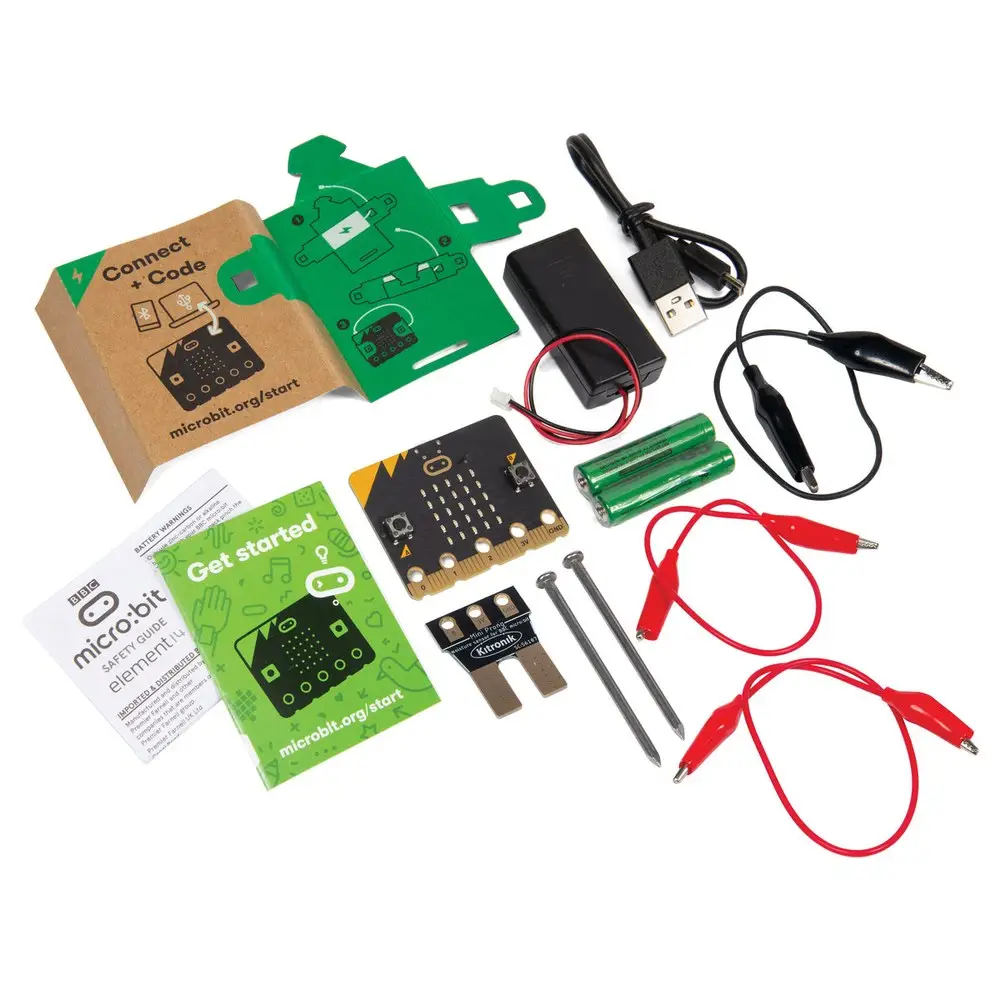
“They’re gonna realize how simple that is. And then it just makes it so flawless and easy to be able to code.”Erin Barr, on building the micro:bit
AI a district leader can understand
Long: Section three has students training AI, machine learning, to help the team make an investment decision. How does that make AI concrete for a teenager, in a way that’s relatable to their lives?
Barr: Microsoft FarmBeats from Pitsco does a great job of helping students really understand what AI is and machine learning. So it’s not this mysterious thing that is some terrible device that we need to worry about. It helps them understand what it actually is.
And it also helps because teenagers are usually pretty money motivated and they are actually trying to figure out the best ways to earn money. And our administrators and district leaders are going to like to see that students are learning how to use artificial intelligence appropriately. They’re learning about machine learning and how those tools actually work.
And then this makes our students more employable. And they have college ready skills, they have work-ready skills. So schools can kind of make a name for themselves when their students are ready to graduate, and colleges are going to be impressed with students, and workplaces are going to be impressed with students.
And it really makes the Microsoft FarmBeats by Pitsco a valuable kind of partner and tool for schools.
“It helps them understand what it actually is.”Erin Barr, on AI and machine learning
Free curriculum, a kit for two
Long: You noted that the kit comes with free curriculum and software, and that it’s shared between two students. From a budget standpoint and a setup standpoint, how does that work out for teachers?
Barr: Microsoft FarmBeats by Pitsco has done a really great job of coming up with this product that has free curriculum that’s available to everyone for free. And then it has the micro:bit kit that includes everything for you that you need for two students. And it’s very inexpensive and easy for school districts to be able to purchase that.
And it has great value in it and is something that you could continue to work with students for years to come. And it’s also nice because there’s kind of like an introductory level for the younger students.
And then sections two and three are more for the older students, like grades nine through twelve, so that they are able to go even farther in depth into the study of ag and different work skills.
“It has great value in it and is something that you could continue to work with students for years to come.”Erin Barr, on the Starter Kit
Where it lives in a school
Long: Microsoft FarmBeats aligns to a lot of standards, from science to ag to computer science. Where would you see a product like this living in a school: an agriculture program, a science class, computer science, an FFA chapter?
Barr: Microsoft FarmBeats by Pitsco is really something that is usable in the science classroom, the computer science classroom, with the FFA chapter, and in STEM classrooms, because it is so usable in any of those areas that I think it could easily live within any of those classroom modules.
Microsoft FarmBeats by Pitsco fits in with so many different standards that teachers are using, from science standards to ag ed standards and computer science standards, that it’s really adaptable to work with any of those areas that you have at your school.
I know at our school, definitely in our STEM and our science classroom, our computer classrooms or even in our coding classes, it would definitely work with any of those areas.
What earns a 10 out of 10
Long: You gave Microsoft FarmBeats a 10 out of 10 on a Net Promoter Score, meaning you would highly recommend it to a friend or a colleague. What earns a 10 from you, and what would you tell a colleague deciding whether to bring it into their classroom?
Barr: A 10 out of 10 for me means that it is something that I can use in my classroom and preferably something that is easy to get out of the box and use right away because I don’t have a lot of extra time to try to gather materials and a bunch of different components.
So Microsoft FarmBeats by Pitsco has everything online that I need with the free curriculum. It’s easy to get set up for students and it’s pretty much ready right out of the box.
You have the kids actually putting the micro:bits together, which is part of the value of this too, is that they are actually doing part of the construction of the equipment that you’re using without the teachers’ need to do that.
And then I also want something that fits in with the standards that I need to use and grade to and show my admin and my district and my state that I am aligning to those important areas, whether it’s Common Core or ISTE standards, that I’m aligning to something within my classroom and not just picking something just because it seems fun.
So it actually is something that we are learning from and aligning to those curriculum standards. And I would tell a colleague that this is something that’s easy to implement, something that students genuinely enjoy and can take ownership of. And I think at the end of the day, that’s usually what teachers are looking for. So this was a definite 10 out of 10 for me.
“I would tell a colleague that this is something that’s easy to implement.”Erin Barr, on what earns a 10 out of 10
Microsoft FarmBeats for Students pairs free curriculum and software with a Starter Kit sold by Pitsco Education and shared between two students: www.pitsco.com/products/microsoft-farmbeats-for-students-starter-kit/. Educator judges rate Best of STEM entries on a Net Promoter Score scale; scores are reported exactly as submitted.
In her own words
Short clips from the interview, one to two minutes each, on the Best of STEM YouTube channel.
Microsoft FarmBeats for Students: Build the micro:bit, Then Start Coding
What does building the micro:bit and its sensors do for students who have never coded? Putting the kit together makes coding feel simple, and students use the sensors right out of the box.
Microsoft FarmBeats for Students: AI and Machine Learning Teens Can Understand
How does training a machine learning model on their own sensor data make AI concrete for teenagers? An investment decision, and what district leaders look for.
Microsoft FarmBeats for Students: Free Curriculum, Low Cost, Fits Your Standards
What does it cost a school to get started, and which standards does it fit? Free curriculum and software, a kit shared by two students, and science, ag ed, and computer science standards.
Microsoft FarmBeats for Students: What Earns a Top Score From a STEM Teacher
What earns a 10 out of 10 from a teacher with no extra time? Ready out of the box, students building the micro:bits themselves, and standards she can grade to and show her district.
Questions educators ask about Microsoft FarmBeats for Students
Tap a question. Quotes from the written review are verbatim; interview quotes are lightly edited for clarity, never for meaning.
What is Microsoft FarmBeats for Students?
Microsoft FarmBeats for Students is Pitsco Education’s hands-on agriculture technology kit and curriculum for grades 5 to 12, built by Microsoft and brought to FFA chapters nationwide with the National FFA Organization. Students build moisture, light, and temperature sensors on a micro:bit, collect data on soil and growing conditions, analyze it, and train AI on that data to make a decision. The curriculum and software are free; the Starter Kit is shared by two students. Erin Barr, the certified classroom teacher who judged it for the 2026 Educators Pick Best of STEM® Awards, wrote:
“Microsoft FarmBeats immerses students in a real world agricultural scenario that provides authentic opportunities to develop skills in computer science, STEM, AI, and career readiness.” (written review, verbatim)
Is Microsoft FarmBeats for Students any good?
By the measure the Best of STEM awards use, yes. Erin Barr, a certified classroom teacher and Best of AI Educator Judge, scored Microsoft FarmBeats for Students 10 out of 10 on whether she would recommend it to a colleague, and it won the 2026 Educators Pick Best of AI for Middle School/High School in the Educators Pick Best of STEM® Awards. Her reasons on camera were time and standards: ready out of the box, and alignments she can show her administrators.
“A 10 out of 10 for me means that it is something that I can use in my classroom and preferably something that is easy to get out of the box and use right away because I don’t have a lot of extra time to try to gather materials and a bunch of different components.”
What do teachers think of Microsoft FarmBeats for Students?
Erin Barr, the certified classroom teacher who judged Microsoft FarmBeats for Students for the 2026 Educators Pick Best of STEM® Awards, scored it 10 out of 10. She teaches math, science, computer science, ELA, and art at the Montana School for the Deaf and the Blind. Her written review, submitted during judging, closes on what students take away:
“Overall, Microsoft FarmBeats provides students the chance to learn about the importance of the ag industry and its global impact, understand how AI and other tech can simplify jobs and save time, all while acquiring work skills that extend across multiple industries.” (written review, verbatim)
How do students learn AI with Microsoft FarmBeats?
In three sections, as Erin Barr describes the Microsoft FarmBeats for Students curriculum in her written review: students set up the micro:bit and build working moisture, light, and temperature sensors; they analyze the data they collected; then they use that data and train AI (machine learning) to help their team make an investment decision for the scenario. On camera, Barr says what that does for a teenager:
“Microsoft FarmBeats from Pitsco does a great job of helping students really understand what AI is and machine learning. So it’s not this mysterious thing that is some terrible device that we need to worry about. It helps them understand what it actually is.”
What standards does Microsoft FarmBeats for Students align to?
NGSS, AFNR (Agriculture, Food and Natural Resources, a CTE pathway), and CSTA standards, according to Pitsco Education, which calls it one of the few classroom programs that meets all three at once. Erin Barr, who judged it, says the same thing from the classroom side:
“Microsoft FarmBeats by Pitsco fits in with so many different standards that teachers are using, from science standards to ag ed standards and computer science standards, that it’s really adaptable to work with any of those areas that you have at your school.”
Does Microsoft FarmBeats for Students work on Chromebooks?
Yes. Pitsco Education lists Microsoft FarmBeats for Students as compatible with Chromebooks, with no specialized software required: the coding runs in Microsoft MakeCode in a browser, and the sensors run on a BBC micro:bit. Erin Barr’s written review names what a student handles:
“FarmBeats uses free curriculum and software with a small kit that includes a micro:bit and is shared between two students.” (written review, verbatim)
Is Microsoft FarmBeats for Students a good fit for FFA chapters?
Microsoft built the program and brought it to FFA chapters nationwide with the National FFA Organization; Pitsco Education sells the Starter Kit and says the program is backed by Microsoft and FFA. Erin Barr, on where Microsoft FarmBeats for Students lives in a school:
“Microsoft FarmBeats by Pitsco is really something that is usable in the science classroom, the computer science classroom, with the FFA chapter, and in STEM classrooms, because it is so usable in any of those areas that I think it could easily live within any of those classroom modules.”
How much does Microsoft FarmBeats for Students cost a school?
The curriculum and software are free. The Microsoft FarmBeats for Students Starter Kit is sold by Pitsco Education, with no recurring software costs, and one kit is shared between two students; the current price is on Pitsco’s product page. Erin Barr, on the budget:
“Microsoft FarmBeats by Pitsco has done a really great job of coming up with this product that has free curriculum that’s available to everyone for free. And then it has the micro:bit kit that includes everything for you that you need for two students. And it’s very inexpensive and easy for school districts to be able to purchase that.”
Who won Educators Pick Best of AI 2026 for middle school and high school?
Microsoft FarmBeats for Students, from Pitsco Education, is the 2026 Educators Pick Best of STEM® Winner for Educators Pick Best of AI for Middle School/High School, announced Aug. 25, 2026. Erin Barr, a certified classroom teacher and K-12 Teacher and STEM Leader at the Montana School for the Deaf and the Blind, judged the entry and scored it 10 out of 10 on the educator Net Promoter Score. From her written review:
“Section three has students using the data and training AI (machine learning) to help the team make an investment decision for the scenario.” (written review, verbatim)
What is a good classroom kit for teaching AI and machine learning with micro:bit sensors?
Microsoft FarmBeats for Students from Pitsco Education: students build a soil moisture sensor and light and temperature sensors on a micro:bit, collect readings, and train a machine learning model on the data they collected. It won the 2026 Educators Pick Best of AI for Middle School/High School in the Educators Pick Best of STEM® Awards, and Erin Barr, the certified classroom teacher who judged it, scored it 10 out of 10. On what building the micro:bit does for a beginner:
“When students are working with the Microsoft FarmBeats and actually having the opportunity to put that kit together and put together the micro:bit, they’re gonna realize how simple that is. And then it just makes it so flawless and easy to be able to code.”
What is the best ag tech curriculum for high school?
The 2026 Educators Pick Best of STEM® Award for Educators Pick Best of AI, Middle School/High School went to Microsoft FarmBeats for Students, Pitsco Education’s precision agriculture curriculum and kit, judged by certified classroom teachers on whether they would recommend it to a colleague; Erin Barr scored it 10 out of 10. It aligns to AFNR, NGSS, and CSTA, runs free curriculum on a micro:bit, and ends each investigation with a decision. Barr, on why a real scenario beats a unit on sensors:
“With the scenario with Microsoft FarmBeats, they have this whole scenario, but you could get different results because you’re doing actual testing of soil and you’re using sensors. And as you’re going through that process, you’re going to get different results. And that’s expected, and that’s a good outcome.”
What does a 10 out of 10 mean from a Best of STEM judge?
Best of STEM judges score each entry on a Net Promoter Score, 0 to 10, for how likely they are to recommend it to a colleague, and scores publish exactly as submitted. Erin Barr, who gave Microsoft FarmBeats for Students a 10, said on camera what she would tell a colleague:
“I would tell a colleague that this is something that’s easy to implement, something that students genuinely enjoy and can take ownership of. And I think at the end of the day, that’s usually what teachers are looking for. So this was a definite 10 out of 10 for me.”
Share with a colleague
The one-screen version to forward to a principal, curriculum director, or CTE coordinator.
 Independent rating
2026 Educators Pick Best of STEM® Winner: Educators Pick Best of AI for Middle School/High School. Judged by certified classroom teachers; this reviewer scored it 10/10.
“Microsoft FarmBeats immerses students in a real world agricultural scenario that provides authentic opportunities to develop skills in computer science, STEM, AI, and career readiness.” (Barr)
“FarmBeats uses free curriculum and software with a small kit that includes a micro:bit and is shared between two students.” (Barr, written review). The Starter Kit is sold by Pitsco Education, with no recurring software costs (Pitsco).
“In section one, students set up the micro:bit and build working moisture, light, and temperature sensors. Section two has students analyzing data that was collected in section one. Section three has students using the data and training AI (machine learning) to help the team make an investment decision for the scenario.” (Barr, written review)
Aligned to NGSS, AFNR, and CSTA standards, Chromebook compatible, coding in Microsoft MakeCode (Pitsco). On camera, Barr places it in the science classroom, the computer science classroom, STEM classrooms, and the FFA chapter.
Built by Microsoft and brought to FFA chapters nationwide with the National FFA Organization; Pitsco Education sells the Starter Kit for grades 5 to 12 (Pitsco). Order or request a quote at pitsco.com.
About this review and the 10 out of 10
The Educators Pick Best of STEM® Awards are judged exclusively by credentialed STEM educators. Each judge scores an entry on a Net Promoter Score, 0 to 10: how likely they are to recommend it to a colleague. Only products the judges would recommend earn recognition. Erin Barr judged the Microsoft FarmBeats for Students entry, Pitsco Education’s award entry and the curriculum and Starter Kit materials; she has not run the kit with her own students. Her score and written review are reported exactly as submitted. How judging works.
Why Microsoft FarmBeats for Students earned a 10/10
Microsoft FarmBeats immerses students in a real world agricultural scenario that provides authentic opportunities to develop skills in computer science, STEM, AI, and career readiness. FarmBeats uses free curriculum and software with a small kit that includes a micro:bit and is shared between two students.
The full curriculum is designed for 20 days across three sections that are divided into a total of seven lessons. Section one is appropriate for students in grades 6 through 12 and sections two and three are appropriate for grades 9 through 12. In section one, students set up the micro:bit and build working moisture, light, and temperature sensors.
Section two has students analyzing data that was collected in section one. Section three has students using the data and training AI (machine learning) to help the team make an investment decision for the scenario.
Overall, Microsoft FarmBeats provides students the chance to learn about the importance of the ag industry and its global impact, understand how AI and other tech can simplify jobs and save time, all while acquiring work skills that extend across multiple industries.
This is an independent, paid review. Pitsco Education paid to take part in Best of STEM Educator Reviews, which produced this interview and the video clips after judging closed and the winners were announced on Aug. 25, 2026. The score and the written review above come from judging and are never changed by that payment.
Published by Catapult X® with lead judge Annie Galvin Teich of The Teich Group. Best of STEM® and Catapult X® are registered trademarks. Microsoft FarmBeats for Students, Microsoft, FarmBeats, and micro:bit are trademarks of their respective owners.
Only finalists and winners of the Best of STEM awards are published as full reviews. Interview quotes are lightly edited for clarity; meaning is never altered.
See all 39 Educators Pick Best of STEM® 2026 winners · More educator reviews · Enter the 2027 Best of STEM Awards